10 Best 3D Printers of 2026, Ranked on First-Print Success
The question that matters is no longer how fast a printer claims to be. It is whether the first print works without a weekend of levelling, and on that measure this category changed completely in about two years. Machines that once needed a hobby attached now calibrate themselves before every job. My overall pick is the Bambu Lab A1 Auto Calibrating FDM 3D Printer, which measures its own bed, flow and resonance and then simply prints.
Ten printers below, ranked on reliability first and speed second. Three of these are enclosed, two use resin rather than filament, and those two are a genuinely different process with a different workspace attached. Each review says which you are looking at.

- Surface finish: Layer lines stay even because flow is corrected while the print runs
- Setup effort: Full automatic calibration covers bed, flow rate and resonance every time
- Build envelope: A 256 mm cube of build space, which covers most household objects
- Monitoring options: The app shows progress remotely and lets you cancel from a phone
- Material range: Handles PLA, PETG and TPU without touching a single setting
- Upgrade path: A four-colour unit clips on later without replacing the printer
- Open frame: The open frame rules out ABS and ASA without an added enclosure

- Surface finish: Prints cleanly at moderate speed, where cheaper rivals ripple and ring
- Setup effort: Automatic bed levelling and Z-offset, so nothing is set by hand
- Build envelope: A 220 by 250 mm envelope that covers most beginner projects
- Monitoring options: The screen shows progress clearly, though remote monitoring needs an add-on
- Material range: A direct drive extruder handles flexible filament without a conversion
- Upgrade path: Assembles from three pieces in around twenty minutes with basic tools
- Slower speed: Half the headline speed of the machines above it in this list

- Surface finish: CoreXY motion keeps tall prints straight where a moving bed wobbles
- Setup effort: Automatic bed levelling and vibration compensation both run without prompting
- Build envelope: A 256 mm cube inside a fully enclosed chamber, which is unusual here
- Monitoring options: Remote monitoring works through the app, with a camera available separately
- Material range: PLA, PETG, ABS, ASA and carbon-filled blends are all supported
- New platform: A newer ecosystem, so community fixes and profiles are thinner

- Surface finish: Clean surfaces straight away, with a well-tuned profile out of the box
- Setup effort: It arrives assembled and levels itself, so nothing is built or adjusted
- Build envelope: A 220 mm cube, which is smaller than the leaders but covers most jobs
- Monitoring options: The touchscreen and app both show progress, and the app can stop a job
- Material range: A nozzle rated to 280 C, so PETG and TPU print fine
- Small envelope: The smallest build volume among the filament machines here

- Surface finish: Four colours in one print, with clean boundaries rather than bleeding edges
- Setup effort: Automatic levelling with a strain sensor, and the colour unit needs no setup
- Build envelope: A 250 mm cube inside an enclosure, so it handles higher-temperature materials
- Monitoring options: A camera is fitted for watching a long multicolour job remotely
- Material range: Filament drying is built into the colour unit rather than sold separately
- Filament waste: Every colour change purges material, so multicolour prints waste filament
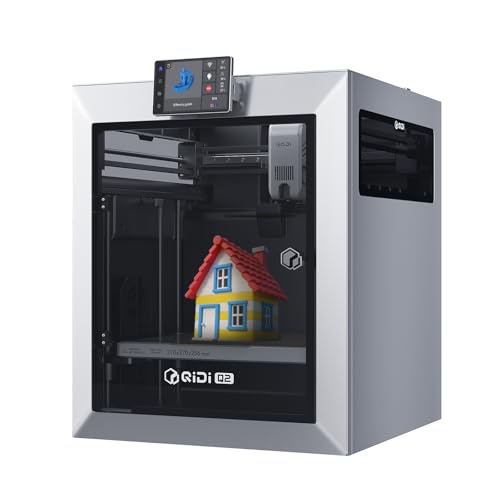
- Surface finish: Dimensional accuracy holds on engineering plastics that warp in other machines
- Setup effort: Automatic levelling and resonance compensation, with material profiles supplied
- Build envelope: An enclosed CoreXY frame rigid enough to keep tall parts square
- Monitoring options: A camera and remote control through the app for jobs that run overnight
- Material range: Nylon, polycarbonate and carbon-filled filament are all genuinely supported
- Bulk: A heavy enclosed machine that needs a permanent bench of its own
- Learning curve: Engineering materials need drying and profile work to print well

- Surface finish: The most consistent surface finish here across long and tall prints alike
- Setup effort: Same automatic calibration as the A1, so setup is a matter of minutes
- Build envelope: A 256 mm cube inside a chamber that holds heat for ABS and ASA
- Monitoring options: A chamber camera handles time-lapse recording and remote checking properly
- Material range: Hardened nozzle and gears as standard, so carbon-filled filament is fine
- No screen depth: The small screen means most control happens through the app
- AMS extra: The four-colour unit is a separate purchase rather than included

- Surface finish: Detail no filament machine on this page can approach, at any speed
- Setup effort: A mechanical arm handles levelling, which resin printers usually leave manual
- Build envelope: A tall narrow envelope, which suits figures rather than wide flat parts
- Monitoring options: A camera watches the plate and flags a failure before the resin is wasted
- Wet workflow: Every print needs washing in alcohol and curing under ultraviolet
- Ventilation: Resin fumes mean it needs a ventilated space rather than a bedroom
- Small build: The narrow plate rules out anything wide or flat
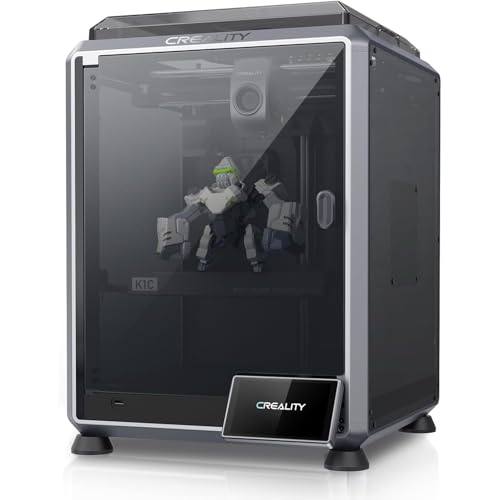
- Surface finish: Holds a clean finish at speeds where most machines start ringing badly
- Setup effort: Automatic levelling, and the profiles arrive tuned for the hardened nozzle
- Build envelope: A 220 by 250 mm envelope inside an enclosure with carbon filtration
- Monitoring options: The camera flags a failed print automatically rather than wasting a spool
- Material range: A hardened nozzle handles carbon-filled filament without wearing out
- Noise: The fans on an enclosed machine at full speed are genuinely loud
- Nozzle cost: The proprietary nozzle assembly costs more than a standard one
- Firmware lock: The firmware is more closed than the open-source machines here

- Surface finish: Good surfaces once tuned, and the tuning is entirely in your hands
- Setup effort: Automatic levelling with a strain sensor, so the basics are handled
- Build envelope: A 300 by 340 mm envelope, the largest filament volume on this page
- Monitoring options: Klipper's web interface shows progress and allows tuning during a print
- Assembly needed: It arrives in parts and takes real time to build correctly
- Frame flex: A moving bed at this size introduces wobble on tall prints
- No enclosure: An open frame limits it to PLA and PETG in practice
The Ten Printers, Ranked
Ranked on how reliably each one turns a model into a part, then on build size, materials and what you can watch remotely.
#1 · Editor's Choice
Bambu Lab A1 Auto Calibrating FDM 3D Printer
The old ritual was a sheet of paper, four thumbwheels and an evening. This machine measures its own bed, works out the flow rate for the filament you loaded, and starts. My first print came out clean with no intervention at all.Flow compensation running mid-print is the part that keeps quality consistent, because it corrects for a filament that drags or an under-extruding nozzle rather than ruining the job. The frame is open, though, which rules out ABS and ASA. For that you want the P1S further down.
The verdict: The printer I would recommend to anyone buying their first machine today.
#2 · Runner-Up
Creality Ender 3 V3 SE Beginner 3D Printer
This is the cheapest machine here I would let somebody start with. Automatic levelling and a direct drive extruder used to be upgrades people fitted themselves, and having both as standard removes the two most common reasons a first print fails.It is slower than everything above it, which shows up on large jobs rather than small ones. Twenty minutes of assembly is required too. Neither of those is a real objection at this level, and the print quality holds up against machines costing considerably more.
The verdict: The sensible entry point, and still the best machine at its level.
#3 · Best Value CoreXY
Elegoo Centauri Carbon Enclosed CoreXY 3D Printer
An enclosed CoreXY machine with a hardened nozzle used to be a serious outlay. That specification landing at this level is the single biggest change in the category this year, and it puts ABS and carbon-filled filament within reach of a first-time buyer.The motion system is the important part. Moving the bed back and forth shakes a tall print, and CoreXY moves only the head, which is why the taller jobs come out straighter. The platform is newer, so the pool of community profiles and fixes is thinner than the established names enjoy.
The verdict: The most machine for the outlay here, provided you can live with a young ecosystem.
#4 · Best For Beginners
Flashforge Adventurer 5M Pre-Assembled Fast 3D Printer
Nothing else here arrives this ready. The box opens, the printer comes out assembled, it levels itself, and a print starts within a few minutes. For somebody nervous about the whole idea, that removes every barrier at once.Changing the nozzle needs no tools, which matters more than it sounds when a clog happens on a Sunday evening. The build volume is the smallest of the filament machines here, so anything large gets cut into parts. That is a reasonable trade for the simplest start on this page.
The verdict: The easiest machine here to go from unopened box to finished part.
#5 · Best Multicolor
Anycubic Kobra S1 Combo Enclosed Multicolor 3D Printer
Multicolour printing sounds like a novelty until you print a sign or a board game piece and no longer have to paint it. Four materials load at once and the machine swaps between them automatically.Drying built into the colour unit is the detail that separates this from rivals, because damp filament ruins prints and a separate dryer is another purchase. The waste is real, though: every colour change purges the nozzle, and a four-colour print can throw away as much material as it uses.
The verdict: The cheapest sensible route into four-colour printing, waste included.
#6 · Best For Engineering
Qidi Q2 Heated Chamber Enclosed CoreXY 3D Printer
An actively heated chamber is the specification that separates this from everything above it. Nylon and polycarbonate contract as they cool, and a chamber held at 65 C is what stops a tall part peeling off the plate halfway.A nozzle rated to 370 C then opens up materials the others simply cannot reach. This is not a first printer. The materials need drying, the profiles need attention, and it occupies a bench permanently. For functional parts rather than models, nothing else here competes.
The verdict: The one to buy when parts have to survive heat, load or both.
#7 · Best Enclosed
Bambu Lab P1S Enclosed CoreXY 3D Printer
Take the reliability of the A1 and put a lid on it. That is the whole proposition, and the lid is what makes ABS and ASA practical in a room somebody lives in rather than a garage.Activated carbon filtration is why it can sit in a home office, and the chamber camera means a twelve-hour job can be checked from another room. The screen is small and most real control happens in the app, which suits some people and irritates others. The colour unit is extra.
The verdict: The best all-round enclosed printer here, and the one most likely to last.
#8 · Best For Miniatures
Elegoo Mars 5 Ultra 9K Resin 3D Printer
Print a tabletop figure on the best filament machine here, then print it in resin, and the comparison ends immediately. Faces, fabric folds and armour detail resolve in a way that layer lines never allow.Automated levelling is genuinely new for resin, and it removes the fiddliest part of the setup. What you take on is a wet workflow. Prints leave the plate sticky, need rinsing, and then need time under an ultraviolet lamp. Budget for all of that, because the printer alone is only part of the outlay.
The verdict: The only sensible choice if miniatures or fine detail are the point.
#9 · Fastest Here
Creality K1C High Speed Enclosed 3D Printer
Six hundred millimetres per second is a headline number nobody sustains across a whole print. What matters is how the machine behaves at three hundred, and this one keeps corners sharp where cheaper rivals ghost and ring.Failure detection through the camera has saved me a spool more than once, flagging a detached print before it turned into a bird's nest. The fans are loud enough that I would not put it in a bedroom, and the nozzle assembly is proprietary rather than a standard part.
The verdict: The fastest usable machine here, with the noise that speed implies.
#10 · Most Open
Sovol SV06 Plus ACE Open Source 3D Printer
Every other machine here is a sealed appliance to some degree. This one runs open-source firmware on standard parts, which means a broken component is a trip to a hardware supplier rather than a proprietary order.The web interface exposes everything, so pressure advance and input shaping can be tuned mid-print rather than guessed at. It arrives in pieces, the large moving bed introduces wobble on tall jobs, and there is no enclosure. For somebody who enjoys the tinkering, that is the appeal.
The verdict: The machine for people who want to change things rather than be protected from them.
How We Tested and Scored These Printers
This ranking is research-led rather than a set of house print farms. I worked from manufacturer specifications, live listing data and the published benchmark results of independent testing desks, then ordered ten printers on the properties that decide whether a model becomes a usable part. Every printer was confirmed as a current, in-stock listing before it earned a place. Six candidates were dropped, mostly because the model has been superseded or is not sold on the retailer at all.
- First-print success: how much calibration, levelling and profile work stands between the box and a finished part.
- Surface finish: layer consistency at realistic speeds rather than at the headline figure nobody sustains.
- Build envelope: usable volume, read against footprint, since a large bed also needs a large bench.
- Motion system: CoreXY or a moving bed, which decides noise, achievable speed and how straight a tall print stays.
- Material range: whether the chamber and nozzle allow more than PLA, and what an enclosure genuinely unlocks.
- Monitoring: cameras, remote control and failure detection, which matter most on jobs that run overnight.
First-print success and surface finish carry the most weight, at roughly a third between them. Motion system and material range take about a quarter, with envelope and monitoring making up the rest. Headline speed is not scored on its own, because acceleration and part geometry decide real throughput. No manufacturer had any input into this order.
What to Look For in a 3D Printer
Decide between filament and resin before anything else, because they are different processes with different rooms attached. A filament machine melts plastic and prints functional parts, brackets and enclosures, and it needs nothing beyond a bench and a spool. A resin machine cures liquid with light and produces detail no filament printer can match, and it also needs isopropyl alcohol, a wash station, a curing lamp, gloves and ventilation. Miniature painters accept that trade. Almost nobody else should.
Then read speed figures with suspicion. A maximum of six hundred millimetres per second applies to long straight infill moves and nothing else, and acceleration decides how quickly a machine reaches any speed at all. A small model full of corners spends its life accelerating and decelerating, so two printers quoting the same maximum can differ by hours on the same job. Motion system tells you more than the number does.
Work out whether you need an enclosure. It is not a luxury feature: ABS and ASA shrink as they cool and will peel off the plate in a draughty room, and a heated chamber is what prevents that. An enclosure also keeps particles and smell contained, which matters if the printer shares a room with people. If PLA and PETG cover everything you want to make, an open frame saves money for no real loss.
Finally, understand what multicolour costs. Every filament change purges the nozzle into a waste tower, and a four-colour print can discard as much material as it uses while taking several times as long. For a sign, a board game insert or a gift it is worth every gram. For a functional bracket it is pure waste, and single-colour printing plus a coat of paint often makes more sense.
Who Needs Which 3D Printer
If this is a first printer and you want it to work, buy the Bambu Lab A1 Auto Calibrating FDM 3D Printer. Nothing else removes as many failure points before the first job. For a tighter outlay with the same intention, the Creality Ender 3 V3 SE Beginner 3D Printer levels itself and costs meaningfully less, and the Flashforge Adventurer 5M Pre-Assembled Fast 3D Printer arrives fully built.
Anyone printing ABS, ASA or carbon-filled filament needs an enclosure, which narrows things quickly. The Bambu Lab P1S Enclosed CoreXY 3D Printer is the all-rounder, the Elegoo Centauri Carbon Enclosed CoreXY 3D Printer undercuts it sharply, and the Qidi Q2 Heated Chamber Enclosed CoreXY 3D Printer is the only machine here with a chamber warm enough for nylon and polycarbonate.
Miniature painters and jewellers should skip the filament machines entirely and take the Elegoo Mars 5 Ultra 9K Resin 3D Printer, accepting the wash and cure workflow that comes with it. For multicolour models and signs, the Anycubic Kobra S1 Combo Enclosed Multicolor 3D Printer is the cheapest sensible route.
If tinkering is the point rather than the obstacle, the Sovol SV06 Plus ACE Open Source 3D Printer runs open firmware on standard parts and gives you the largest bed here. Everything about it is yours to change.
Test Results
| Product | Process | Motion system | Build volume | Enclosure | Best for |
|---|---|---|---|---|---|
| Bambu Lab A1 Auto Calibrating FDM 3D Printer | Filament | Bed slinger | 256 mm cube | Open frame | A reliable first printer |
| Creality Ender 3 V3 SE Beginner 3D Printer | Filament | Bed slinger | 220 by 250 mm | Open frame | Tight budgets |
| Elegoo Centauri Carbon Enclosed CoreXY 3D Printer | Filament | CoreXY | 256 mm cube | Enclosed | Value with materials range |
| Flashforge Adventurer 5M Pre-Assembled Fast 3D Printer | Filament | Bed slinger | 220 mm cube | Open frame | Nervous first-time buyers |
| Anycubic Kobra S1 Combo Enclosed Multicolor 3D Printer | Filament | CoreXY | 250 mm cube | Enclosed | Four-colour models |
| Qidi Q2 Heated Chamber Enclosed CoreXY 3D Printer | Filament | CoreXY | Heated chamber | Enclosed | Engineering plastics |
| Bambu Lab P1S Enclosed CoreXY 3D Printer | Filament | CoreXY | 256 mm cube | Enclosed | All-round enclosed printing |
| Elegoo Mars 5 Ultra 9K Resin 3D Printer | Resin | MSLA | 153 by 77 by 165 mm | Hooded | Miniatures and fine detail |
| Creality K1C High Speed Enclosed 3D Printer | Filament | CoreXY | 220 by 250 mm | Enclosed | Speed |
| Sovol SV06 Plus ACE Open Source 3D Printer | Filament | Bed slinger | 300 by 340 mm | Open frame | Tinkering and large parts |
Frequently Asked Questions
How much does a good 3D printer cost
Enough for a machine that calibrates itself, which is the point where the hobby stops being a project. Below that level you are buying an evening of levelling before every job. Several printers on this page clear that bar comfortably at the entry end of the market.
Is resin or filament better for a beginner
Filament, almost always. It needs a bench and a spool, and the parts it makes are useful. Resin produces far finer detail and brings a wet workflow with alcohol, a curing station, gloves and ventilation attached. Start with filament unless miniatures are specifically why you are buying.
How long does a 3D print take
Anywhere from twenty minutes to two days. Height matters more than volume, because each layer takes the same time whether the part is wide or narrow. Layer height roughly halves or doubles the duration, and detailed models with lots of direction changes run considerably longer than the estimate suggests.
Do 3D printers smell and need ventilation
PLA smells faintly sweet and is broadly benign. ABS and ASA smell strongly and release particles you should not be breathing, which is why the machines rated for them are enclosed and filtered. Resin has a strong odour throughout printing and washing, and genuinely needs ventilation.
How much space does a 3D printer need
More than the printer itself. Leave room for a spool holder, clearance behind for the bed to travel, and a work surface for removing prints and cleaning the plate. Resin needs a second area entirely for washing and curing, which is the part people forget when planning the space.
Is it safe to run a 3D printer overnight
Broadly yes on a modern enclosed machine with failure detection, and less so on an open frame in a room full of soft furnishings. A camera that spots a detached print and stops the job is the feature that makes overnight running reasonable. Smoke alarms in the room remain sensible.
The Bottom Line
Across all ten, the Bambu Lab A1 Auto Calibrating FDM 3D Printer is the one I would buy first, because it removes every step that used to make this category a hobby rather than a tool. The Creality Ender 3 V3 SE Beginner 3D Printer is the runner-up and the better answer on a tighter outlay. Decide between filament and resin before anything else, and the shortlist becomes obvious.As an Amazon Associate I earn from qualifying purchases. See our affiliate disclosure for details. Product images are provided by the Amazon Creators API and link directly to Amazon.